Out of stock and oversold on Shopify: how to stop losing sales
Key takeaways
- Out of stock means zero units available; oversold means the count has gone below zero because you took orders you can't fill from stock.
- Turn on "Continue selling when out of stock" only for pre-orders, made-to-order or fast-restock items; leave it off everywhere else.
- Days of stock left = units on hand ÷ average daily sales; reorder point = average daily sales × lead time in days + safety stock.
- Check weekly for oversold, out-of-stock and low-stock variants, products with inventory not tracked, dead stock (no sales in 60 days) and stock on products that aren't for sale.
Running out of a best seller costs you sales. Overselling it costs you sales and a customer's trust. Both usually come from a few inventory settings and a missing reorder habit, and both are fixable in an afternoon.
What is the difference between out of stock and oversold?
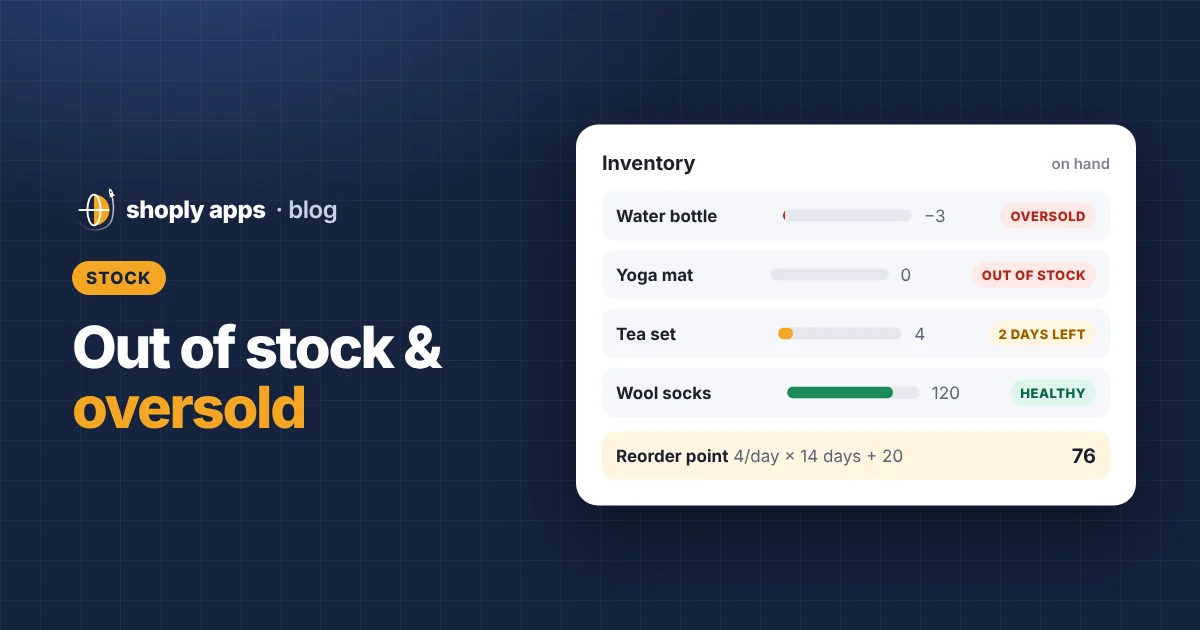
Out of stock means a variant has zero units available to sell. Oversold means the available quantity has gone below zero, so you have accepted more orders than you have units.
Shopify tracks inventory per variant (one sellable version of a product, such as "Blue / Medium"). Negative inventory, for example -3, is the number of units you owe customers with nothing on the shelf.
Out of stock is a lost-sale problem: shoppers see "Sold out" (in most themes) and leave. Oversold is a fulfilment problem: someone has paid and is waiting for something you don't have.
When is "Continue selling when out of stock" fine, and when is it risky?
"Continue selling when out of stock" is a per-variant setting that lets customers keep ordering after stock reaches zero. It is fine when you can reliably deliver without stock on hand, and risky when you can't.
You will find it in your Shopify admin by opening a product and looking at the variant's inventory section, next to the option to track quantity.
It is usually fine for:
- Pre-orders, where the customer knows the ship date before paying.
- Made-to-order or print-on-demand items, where you make each one after the order arrives.
- Fast restock items your supplier can ship within days, if your delivery promise allows for that.
It is risky when it was switched on by accident or left on after a pre-order ended. The product page looks normal, orders keep coming in, and the count quietly goes negative. Each of those orders becomes a delay, a cancellation or a refund.
A good habit: every variant with this setting on should have a reason you can name. If not, turn it off.
What happens when inventory isn't tracked?
If quantity tracking is off for a variant, Shopify never marks it as sold out and never warns you. It will keep selling no matter how many you actually have.
That makes sense for digital products and services. For physical products it is a common hidden cause of overselling, because there is no count to warn you. Make sure every physical product has tracking on and a realistic quantity entered.
How do the four inventory states compare?
Here they are side by side.
| State | What it means | What shoppers see | Usual fix |
|---|---|---|---|
| Out of stock | Available is 0, selling stops | Sold out | Reorder, or hide it if it won't come back |
| Oversold | Available is below 0 | Often nothing unusual | Restock or contact customers, then fix the setting or the count |
| Taking orders with no stock | Continue selling is on and available is 0 or less | Product still for sale | Keep only for pre-order or made-to-order; otherwise turn off |
| Not tracked | Shopify doesn't count units | Always for sale | Turn on tracking for physical products |
What is a good low-stock threshold?
A low-stock threshold is the quantity at which you want a warning. A fixed number like 5 is a start, but the better threshold is based on how fast each product sells.
Five units of a product that sells one a month is plenty. Five units of one that sells ten a day is half a day of stock. That is why the next two formulas matter more than any single number.
If you want automatic warnings, Shopify Flow can be set up to send an alert when a variant's inventory drops below a quantity you choose.
How do you estimate how many days of stock you have left?
Divide units on hand by average daily sales. The result is roughly how many days until the variant sells out at its current pace.
Days of stock left = units on hand ÷ average daily sales
Worked example. You have 84 units of a linen tote. It sold 120 units in the last 30 days.
- Average daily sales = 120 ÷ 30 = 4 units a day
- Days of stock left = 84 ÷ 4 = 21 days
Use a recent window, such as the last 30 days. If the product was sold out for part of that window, count only the days it was for sale, or the average will understate real demand.
When should you reorder? Use a reorder point
Reorder when units on hand drop to your reorder point: average daily sales multiplied by your supplier's lead time, plus a safety buffer.
Reorder point = average daily sales × lead time (days) + safety stock
Lead time is the number of days from placing a purchase order to having stock ready to sell. Safety stock is extra stock that covers slow deliveries or a busy week. A simple way to set it is a few extra days of sales.
Worked example. Same tote: 4 units a day. Your supplier takes 14 days, and you want 5 extra days of cover.
- Stock used during lead time = 4 × 14 = 56 units
- Safety stock = 4 × 5 = 20 units
- Reorder point = 56 + 20 = 76 units
You have 84 units, 8 above the reorder point, so order within about 2 days. Wait until you hit zero and you face roughly two weeks sold out.
What is dead stock, and why does it matter?
Dead stock is inventory that isn't selling. A practical rule is any variant with units on hand and no sales in the last 60 days.
Dead stock ties up cash you could spend restocking best sellers. Feature it in an email, bundle it with a product that does sell, discount it, or stop reordering it. If you discount, keep the price above your cost per item; our guide on products selling below cost shows how to check.
Stock sitting on products that aren't for sale
A related leak: units on hand for products that customers can't buy. That includes products in draft or archived status, and active products that aren't available on any sales channel. The stock exists, it cost you money, and nobody can see it.
Sometimes that is deliberate, such as an upcoming launch. Often it is a product someone unpublished and forgot. Either make it available, sell the stock another way, or write it off.
What should a weekly inventory routine look like?
Twenty minutes once a week catches most of these problems early:
- Oversold: find any variant with negative available stock. Contact affected customers first, then fix the cause.
- Taking orders with no stock: list variants with "Continue selling when out of stock" on. Confirm each has a reason.
- Out of stock: reorder best sellers, and hide or archive anything that won't come back.
- Will sell out soon: calculate days of stock left for your top sellers and compare against lead time. Place orders for anything at or below its reorder point.
- Not tracked: make sure every physical product has quantity tracking on.
- Dead stock: flag variants with no sales in 60 days and decide what to do with each.
- Not for sale: check draft, archived and unpublished products that still hold stock.
By hand, this gets slow once you have hundreds of variants. Shoply: Item Scan & Analytics, our app on the Shopify App Store, runs these stock checks across every product and ranks what it finds by what it costs you per month. For the wider picture beyond stock, see our monthly catalog health checklist.
FAQ
What does oversold mean on Shopify?
Oversold means a variant's available quantity has gone below zero: you have taken more orders than you have units. It usually happens when "Continue selling when out of stock" is on, or when stock counts in Shopify don't match what is on the shelf.
Should I turn on "Continue selling when out of stock"?
Only for products you can deliver without stock on hand, such as pre-orders, made-to-order items or items your supplier ships quickly. For everything else, leave it off so the product shows as sold out instead of taking orders you can't fill.
How do I know when to reorder a product?
Use a reorder point: average daily sales × supplier lead time in days + safety stock. When units on hand drop to that number, place the order. For example, 4 units a day × 14 days + 20 safety stock = reorder at 76 units.
What counts as dead stock?
A common rule of thumb is any product with stock on hand that hasn't sold in 60 days. It ties up cash and shelf space, so discount it, bundle it, promote it or stop reordering it.
Catch stock problems before your customers do
Shoply: Item Scan & Analytics checks every product for oversold, out-of-stock, low-stock and dead stock, plus products taking orders with no stock, and can email you alerts. It is free to install from the Shopify App Store.
Install free on Shopify