Shopify email marketing for beginners: build a list and send emails that sell
Key takeaways
- Shopify email marketing lets you reach people who agreed to hear from you, on a list you own, unlike social media reach that a platform controls.
- Only email people who gave marketing consent, include an unsubscribe link and your business address where required, and check the rules for the countries you sell to.
- Build your list with a footer form, a pop-up with a clear reason to join, marketing consent at checkout and an invite after purchase.
- Set up six automations first: welcome, abandoned checkout, post-purchase, review request, win-back and back-in-stock, then add three to four campaigns a month.
- Judge emails on clicks, orders, revenue per email and unsubscribes rather than open rates, which have become less reliable.
Shopify email marketing means sending emails from your store to people who agreed to hear from you: automatic emails triggered by what a shopper does, plus regular campaigns about products, guides and offers. It is one of the few marketing channels you fully control, and a beginner can set up the basics in a few weeks. This guide covers consent, building a list, the automations to set up first, what to send each month and how to tell whether it is working.
Why does Shopify email marketing matter for your store?
Email matters because you own the list. On social media, the platform decides how many of your followers see a post, and that reach can change overnight. An email list is a set of contacts who asked to hear from you, and you can reach them whenever you have something worth saying.
Email also costs little per message once it is set up, works for repeat sales as well as first orders, and runs in the background through automations. That makes email marketing for ecommerce a good fit for small stores without a big ad budget.
Which email tool should you use on Shopify?
Start with whatever lets you send consented, well-designed emails and set up basic automations; you can switch later. Shopify has its own email marketing tool, Shopify Email, which works inside your admin and uses your store's products and branding. There are also many third-party email apps in the Shopify App Store with more advanced segmentation and reporting.
Features and pricing change, so check Shopify's current pricing and each app's listing before you decide. For a beginner, the deciding questions are simple: does it sync your Shopify customers and their marketing consent, does it include templates for the automations below, and can you understand its reports?
Who are you allowed to email?
Only email people who have agreed to receive marketing from you. A customer who placed an order has not automatically opted in to newsletters, and buying an email list is never a good idea. Shopify records each customer's email marketing status, and your checkout and signup forms can collect that consent.
The rules differ by country. In the EU, GDPR and the ePrivacy rules set strict requirements for consent; in the US, the CAN-SPAM Act sets rules for commercial email. Keep it general and safe:
- Ask clearly and get a real yes, not a pre-ticked box.
- Put an unsubscribe link in every marketing email and honour it promptly.
- Include your business name and postal address where the law requires it.
- Never hide who the email is from or mislead in the subject line.
If you sell into several countries, ask a local adviser what applies to you.
How do you build an email list on Shopify?
To build an email list on Shopify, give visitors a clear reason to join and ask in the places they already look: the footer, a pop-up or banner, the checkout and the time just after a purchase. Every one of these should record marketing consent.
- Footer signup form. Most Shopify themes include a newsletter block. Make sure it is switched on and says what people will get.
- Pop-up or banner. Offer a reason to join, such as a small discount on a first order, early access to new products, or a useful guide. Delay it a few seconds so it does not block the page straight away, and make it easy to close on mobile.
- Checkout. Turn on the option for customers to sign up for email marketing at checkout in your Shopify settings.
- After purchase. Buyers who did not opt in at checkout can be invited on the thank-you page or with a link in their order confirmation.
If you offer a discount to join, make sure your margin can absorb it. A welcome code on a product with a thin margin can turn the first order into a loss; our guide to dropshipping profit margins shows how to check.
Which email automations should every Shopify store set up?
Set up six automations first: welcome, abandoned checkout, post-purchase, review request, win-back and back-in-stock. An automation (sometimes called a flow) is an email or short series sent automatically when a shopper does something, so it keeps working without you.
| Automation | Trigger | Goal |
|---|---|---|
| Welcome series | Someone joins your list | Introduce the brand and turn a subscriber into a first-time buyer |
| Abandoned checkout | Shopper starts checkout but does not finish | Remind them and answer the doubt that stopped them |
| Post-purchase thank you | Order placed or delivered | Thank the buyer, explain how to use or care for the product |
| Review request | Some time after delivery | Collect reviews that help future shoppers decide |
| Win-back | No order for a long time | Bring lapsed customers back with news or a reason to return |
| Back-in-stock | A product someone asked about is restocked | Turn existing demand into a sale quickly |
The welcome series is the one to build first, because new subscribers are usually at their most interested. Our welcome email series guide covers what to send and when. Abandoned checkout comes next; see Shopify abandoned cart recovery for timing and wording.
Back-in-stock and best-seller emails only work if the product is actually available. Promoting something that has sold out sends shoppers to a dead end, so keep stock in check; our guide to out of stock and oversold products explains how.
What should you send in your monthly email campaigns?
A campaign is a one-off email sent to your list or a segment of it, such as a new product announcement. A simple monthly calendar of three to four campaigns is enough for most small stores:
- Week 1: new products or new arrivals.
- Week 2: best sellers, with real customer reviews.
- Week 3: a guide or tip, such as how to choose a size or care for a product.
- Week 4: a seasonal or themed email linked to the time of year.
Run a sale only occasionally. If every email has a discount, subscribers learn to wait for the next one and your margin shrinks on orders that would have happened anyway.
How do you write emails that sell?
Emails that sell have one clear message, one clear button and a subject line that tells people why to open. Keep each email focused on a single job.
- Subject line: short, specific and honest. "New: the linen shirt in three colours" beats "You won't believe this!"
- One main message: one product, one collection or one idea per email.
- One clear button: a single call to action such as "Shop the collection", linking to the right page.
- Mobile-first: many people read email on their phones, so use large text, short paragraphs and a button that is easy to tap.
- Real product photos: clear, honest images of the product in use. Our product photography guide shows how to take them on a small budget.
You can choose a designed style, with images, colours and product blocks, or a plain-text-like style that reads like a note from the owner. Designed emails suit product launches; plain-looking emails often feel more personal for welcome messages and stories. Try both and compare clicks.
How do you segment your email list?
Segmentation means splitting your list into groups so each group gets more relevant emails. Start with three simple splits:
- Buyers vs non-buyers: non-buyers need reasons to trust you; buyers need reasons to come back.
- Product interest: people who bought or browsed one category get news about that category.
- Recency: recent buyers, customers who have not ordered for a while, and subscribers who have not engaged in months.
How do you keep your emails out of the spam folder?
Deliverability is whether your emails reach the inbox rather than spam. The basics:
- Authenticate your sending domain. SPF, DKIM and DMARC are DNS records that prove your emails really come from your domain. Your email tool will guide you through adding them.
- Remove inactive subscribers. People who have not opened or clicked in a long time drag down your reputation. Send them one re-engagement email, then remove those who still do not respond.
- Avoid spammy habits. No bought lists, no misleading subject lines, no walls of capital letters, and a visible unsubscribe link.
Which email marketing metrics should you track?
Track click rate, orders (conversions), revenue per email and unsubscribe rate. These tell you whether emails lead to sales and whether you are sending too much.
- Click rate: the share of recipients who clicked a link.
- Conversions: orders that came from the email.
- Revenue per email: revenue from the email divided by emails sent, which lets you compare campaigns of different sizes.
- Unsubscribe rate: the share who opted out; a sudden rise means a message or frequency missed the mark.
Open rates have become less reliable. Some email apps, including Apple Mail with Mail Privacy Protection turned on, load images automatically, which can count an email as opened even if nobody read it. Use opens as a rough signal only.
How do you calculate revenue per email? A worked example
Divide the revenue an email generated by the number of emails sent. All numbers below are examples, not benchmarks.
Revenue per email = Revenue from the email ÷ Emails sent
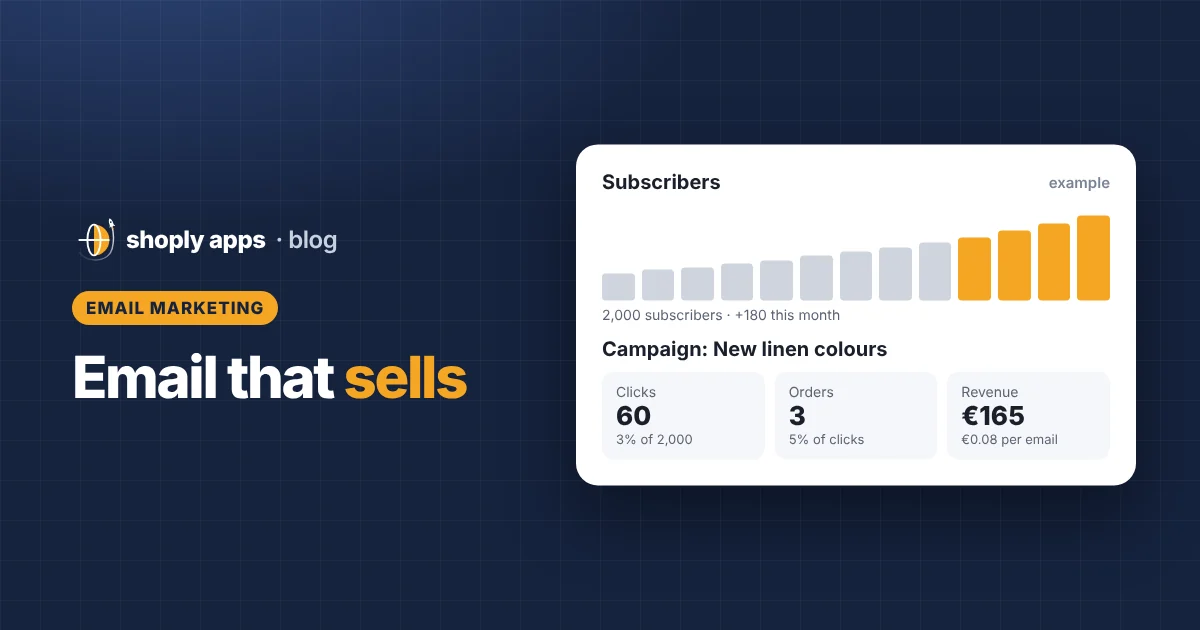
Example: you send a campaign to a list of 2,000 subscribers.
- Example click rate of 3%: 2,000 × 0.03 = 60 clicks
- Example conversion rate of 5% of clicks: 60 × 0.05 = 3 orders
- Example average order value of €55: 3 × €55 = €165 revenue
- Revenue per email = €165 ÷ 2,000 ≈ €0.08
If a better subject line and clearer button lift the click rate to 4%, the same list gives 80 clicks, 4 orders, €220 and about €0.11 per email. Small changes add up when every campaign goes to the whole list. Also check the profit on those orders, not just revenue, especially when the email carried a discount.
What is a simple 30-day email marketing plan for beginners?
Spend the first month on foundations and the automations, then add campaigns. A starter plan:
| Days | Task |
|---|---|
| 1–3 | Choose an email tool, connect it to Shopify, add your business address and authenticate your sending domain |
| 4–7 | Turn on the footer signup, checkout marketing consent and a simple pop-up with a clear reason to join |
| 8–12 | Build and test the welcome series |
| 13–16 | Set up abandoned checkout and post-purchase emails |
| 17–20 | Add review request, back-in-stock and win-back emails |
| 21–25 | Plan next month's campaign calendar and send your first campaign |
| 26–30 | Review clicks, orders, revenue per email and unsubscribes; adjust one thing at a time |
Before each campaign, check that the products you feature are in stock, priced correctly and have good descriptions and images. Shoply: Item Scan & Analytics, free on the Shopify App Store, scans every product for stock, pricing and content problems, so you can fix them before an email sends shoppers to them.
FAQ
Can I email customers who bought from my Shopify store?
Only send marketing emails to customers who agreed to receive them, for example by ticking the email marketing option at checkout. Order and shipping emails are different, but newsletters and promotions need consent, and rules vary by country.
What is the first email automation a Shopify store should set up?
Start with a welcome series for new subscribers, then add abandoned checkout emails. Together they reach people at the moments they are most interested in your store.
How often should a small Shopify store send email campaigns?
Three to four campaigns a month is a practical start for most small stores, alongside your automations. Watch your unsubscribe rate and clicks, and send less if people lose interest.
Why are my email open rates unreliable?
Some email apps, including Apple Mail with Mail Privacy Protection, load images automatically, which can record an open even if nobody read the email. Judge emails mainly on clicks, orders and revenue per email.
Make sure the products in your emails are ready to sell
Shoply: Item Scan & Analytics, free on the Shopify App Store, flags products that are out of stock, selling below cost or missing descriptions and images, so every email sends shoppers to products worth buying.
Install free on Shopify