How to increase your Shopify conversion rate: 15 practical fixes
Key takeaways
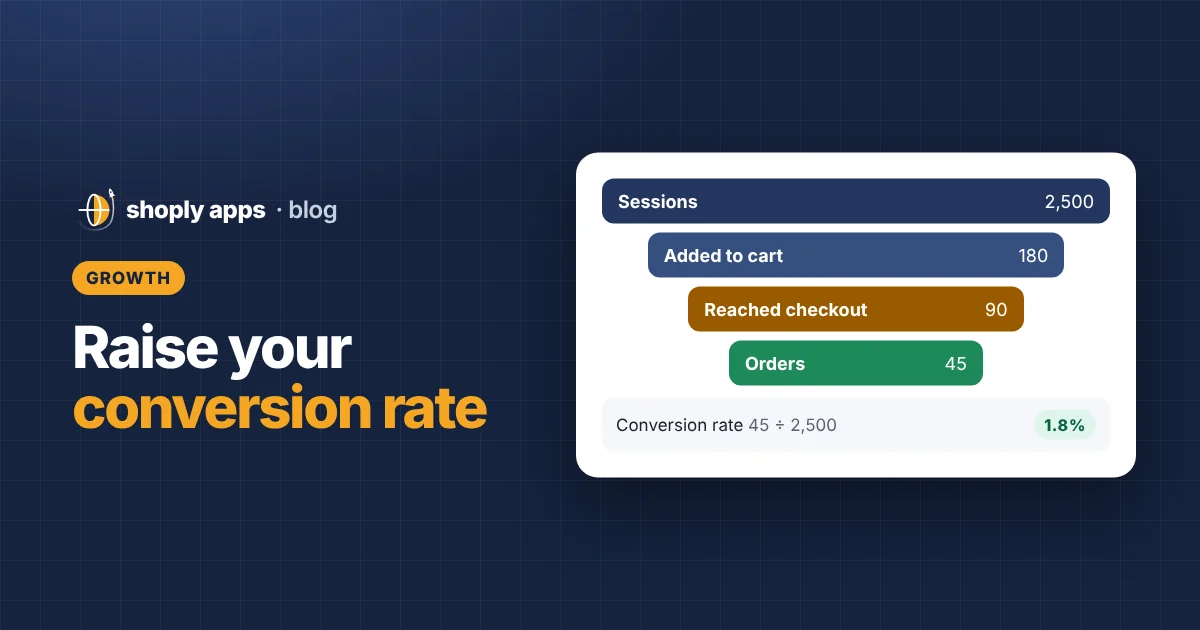
- Your Shopify conversion rate is orders ÷ sessions × 100, so 45 orders from 2,500 sessions is a 1.8% conversion rate.
- There is no universal "good" rate: it varies widely by niche, price and traffic source, so compare against your own past results.
- Most gains come from removing doubts and surprises: clear photos, specific descriptions, shipping costs and return policy shown early, real reviews and a fast mobile page.
- Fix the basics too: keep best sellers in stock, remove weak or empty product pages, and make sure every sale price is lower than its compare-at price.
- Change one thing at a time and compare equal periods with enough traffic before deciding it worked.
Your Shopify conversion rate is the share of store visits that end in an order. If you are getting traffic but few sales, raising it is usually cheaper than buying more visitors. This guide shows how to calculate it, where to find it in Shopify, and 15 practical fixes, grouped by where shoppers drop off.
What is a Shopify conversion rate, and how do you calculate it?
Conversion rate is the percentage of sessions that end in an order. A session is one visit to your store, which can include many page views; one person who visits on Monday and again on Friday counts as two sessions.
Conversion rate = Orders ÷ Sessions × 100
A worked example, with made-up numbers: last month your store had 2,500 sessions and 45 orders.
- 45 ÷ 2,500 = 0.018
- 0.018 × 100 = 1.8% conversion rate
Now suppose your fixes lift that to 2.2% with the same 2,500 sessions. That is 55 orders instead of 45: ten extra orders without spending more on traffic. If your average order is $40 (again, an example), that is about $400 more revenue a month.
Where do you see it in Shopify?
Open Analytics in your Shopify admin. The overview shows your online store conversion rate for the date range you pick, and the reports section has conversion reports that break the journey into steps, such as sessions that added to cart, reached checkout and completed an order. That breakdown tells you where people leave, which tells you which group of fixes below to start with. Menu names change over time, so look for "conversion" in Analytics.
Is there an average Shopify conversion rate?
You will see "average" figures quoted online, but treat them with care. Conversion rates vary widely by niche, price, traffic source and device. A store selling $15 phone cases to returning customers will look very different from one selling $900 sofas to cold social media traffic. The benchmark that matters is your own store: compare this month with last month, and the same month last year.
How do you improve product pages to convert more visitors?
Answer every question a shopper has before they need to ask it. A product page that leaves doubts is the most common reason people browse and leave.
- Use clear, honest product photos. Show the product from several angles, close up and in use, with something that gives a sense of size. Every product needs at least one image.
- Write specific descriptions that answer buyer questions. Swap vague phrases like "premium quality" for facts: material, dimensions, weight, what is in the box, care instructions, compatibility and who it is for. A useful test: list the five questions customers email you about, and answer them on the page. Our product page SEO checklist covers descriptions, titles and alt text in more detail.
- Make navigation and search simple. Keep your main menu short, name collections the way customers would, and make sure the search bar is easy to find on mobile.
How do you build trust on a Shopify store?
Show proof that a real business with real customers stands behind the store. New visitors do not know you, so they look for signs that it is safe to buy.
- Show real customer reviews. Collect reviews from actual buyers and show them on product pages, including the less-than-perfect ones. Never write or buy fake reviews: it misleads customers and can break advertising and consumer protection rules.
- Make contact details easy to find. Put an email address, a contact page and, if you have them, a phone number or business address in the footer.
- Put shipping times and your return policy on the product page. "Ships in 1–2 business days, delivered in 3–5" and "30-day returns" next to the Add to cart button answer two big worries at the moment of decision. Only promise what you can deliver; if you dropship with long delivery times, say so plainly.
How do you reduce cart abandonment at checkout?
Remove surprises and extra steps. Most shoppers who leave at checkout are reacting to an unexpected cost, a missing payment option or a slow, fiddly form.
- Show the price and shipping costs early. Display the price clearly near the top of the product page, and give a shipping cost or "free shipping over $X" line before the cart. Shoppers who discover shipping costs only at checkout often leave.
- Reduce surprise costs at checkout. Check the full journey yourself: does the final total match what the shopper expected? Taxes and duties depend on your country and your customers' countries, so set them up as your accountant advises and explain them clearly.
- Offer accelerated and wallet checkout options. Express buttons such as Shop Pay, Apple Pay or Google Pay let shoppers pay with saved details instead of typing a card number on a phone. Which options you can offer depends on your payment provider and country, so check your payment settings.
- Consider a free-shipping threshold. Offering free shipping above a set order value, such as $50 in this example, can encourage people to add one more item. In Shopify you can set this up as a shipping rate with a minimum order price. Do the maths first: the shipping you pay comes out of your margin, so set the threshold above your average order value and check that orders just over the line still make a profit. Our guide to pricing for healthy margins shows how.
Why does mobile speed matter for conversion rate?
Many shoppers browse on their phones, and a slow page loses them before they see the product. Speed fixes help every visitor on every page.
- Make mobile pages fast. Compress large images before uploading, avoid giant hero videos, and remove apps you no longer use, since many add scripts that load on every page. Then open your store on your own phone over mobile data, not Wi-Fi, and buy something from start to finish.
How do stock and pricing problems hurt conversions?
Catalog mistakes quietly turn interested visitors away. A shopper who lands on a sold-out best seller, an empty page or a broken "sale" price is unlikely to buy.
- Keep best sellers in stock. Your most-visited products are where conversion gains count most. Watch their stock levels, reorder before they run out, and if something does sell out, say when it will be back. Our guide to out-of-stock and oversold products explains how to stay ahead of it.
- Remove or fix weak or empty product pages. Products with no image, no description or a two-line description make the whole store look unfinished. Either complete them or take them off sale until they are ready.
- Correct your compare-at prices. The compare-at price is the crossed-out "was" price. A sale price must be lower than the compare-at price; if they are equal, or the compare-at is lower, the "sale" looks like a mistake. Clear compare-at prices when a sale ends.
These catalog problems are easy to miss across hundreds of products. Shoply: Item Scan & Analytics, free on the Shopify App Store, scans every product for issues like out of stock, low stock, no image, short descriptions and compare-at prices that are not higher than the price, and ranks them by money at stake.
How do you test changes to your Shopify store?
Change one thing at a time so you know what made the difference.
- Test one change at a time. If you rewrite descriptions, add express checkout and launch a sale in the same week, you will not know which one helped, or which one hurt. Write down what you changed and the date, then measure before moving to the next fix.
Checklist: 15 fixes to improve Shopify sales
Use this table to plan your work. Effort is a rough guide; it depends on how many products you have.
| # | Fix | Area | Effort |
|---|---|---|---|
| 1 | Clear product photos | Product pages | Medium |
| 2 | Specific descriptions that answer questions | Product pages | Medium |
| 3 | Simple navigation and search | Product pages | Low |
| 4 | Real customer reviews | Trust | Medium |
| 5 | Visible contact info | Trust | Low |
| 6 | Shipping times and return policy on product page | Trust | Low |
| 7 | Price and shipping costs shown early | Checkout and shipping | Low |
| 8 | No surprise costs at checkout | Checkout and shipping | Low |
| 9 | Accelerated and wallet checkout | Checkout and shipping | Low |
| 10 | Free-shipping threshold | Checkout and shipping | Medium |
| 11 | Fast mobile pages | Speed and mobile | Medium |
| 12 | Best sellers in stock | Stock and pricing | Medium |
| 13 | Fix or remove weak product pages | Stock and pricing | High |
| 14 | Correct compare-at prices | Stock and pricing | Low |
| 15 | Test one change at a time | Testing | Low |
How do you measure whether a fix increased your conversion rate?
Compare your conversion rate over two equal periods, one before and one after the change, with enough traffic for the difference to be real. A few rules keep the comparison fair:
- Use equal periods. Compare 14 days with 14 days, and ideally the same days of the week, because weekends and weekdays often behave differently.
- Wait for enough traffic. With small numbers, a couple of orders swings the rate a lot. At 300 sessions, going from 4 orders to 6 moves the rate from 1.3% to 2.0% by chance alone. Let the test run until you have a meaningful number of orders, which for a small store can take several weeks.
- Watch your traffic mix. A new ad campaign or a social post going viral changes who visits and can move the rate on its own.
- Avoid sales and holidays. Don't judge a product page change during Black Friday or a big promotion.
- Check revenue, not just the rate. A big discount can raise conversion rate while lowering profit. Keep an eye on average order value and margin too.
To keep these improvements from slipping, fold them into a regular routine like our monthly catalog health checklist.
FAQ
What is a good conversion rate for a Shopify store?
There is no single good number. Conversion rate varies widely by niche, price, traffic source and device, so a figure that is normal for cheap accessories can be unrealistic for furniture. The most useful benchmark is your own store: compare this month with past months and aim to move it up.
How do I calculate my Shopify conversion rate?
Divide the number of orders by the number of sessions in the same period, then multiply by 100. For example, 45 orders from 2,500 sessions is 45 ÷ 2,500 × 100 = 1.8%.
Why do I get add-to-carts but no sales?
Usually something at the cart or checkout surprises or worries the shopper: shipping costs or delivery times shown late, few payment options, or doubts about returns. Show shipping costs and delivery times on the product page and test your checkout yourself on a phone.
How long should I wait before judging a change?
Wait until you have enough sessions and orders for the result to mean something, which for a small store often means a few weeks. Compare equal periods with similar traffic, and avoid judging a change during a sale or holiday.
Find the product problems that cost you sales
Shoply: Item Scan & Analytics, free on the Shopify App Store, checks every product for missing images, thin descriptions, stock problems and broken compare-at prices, then ranks them by money at stake so you fix what matters first.
Install free on Shopify