How to start dropshipping on Shopify: a step-by-step guide
Key takeaways
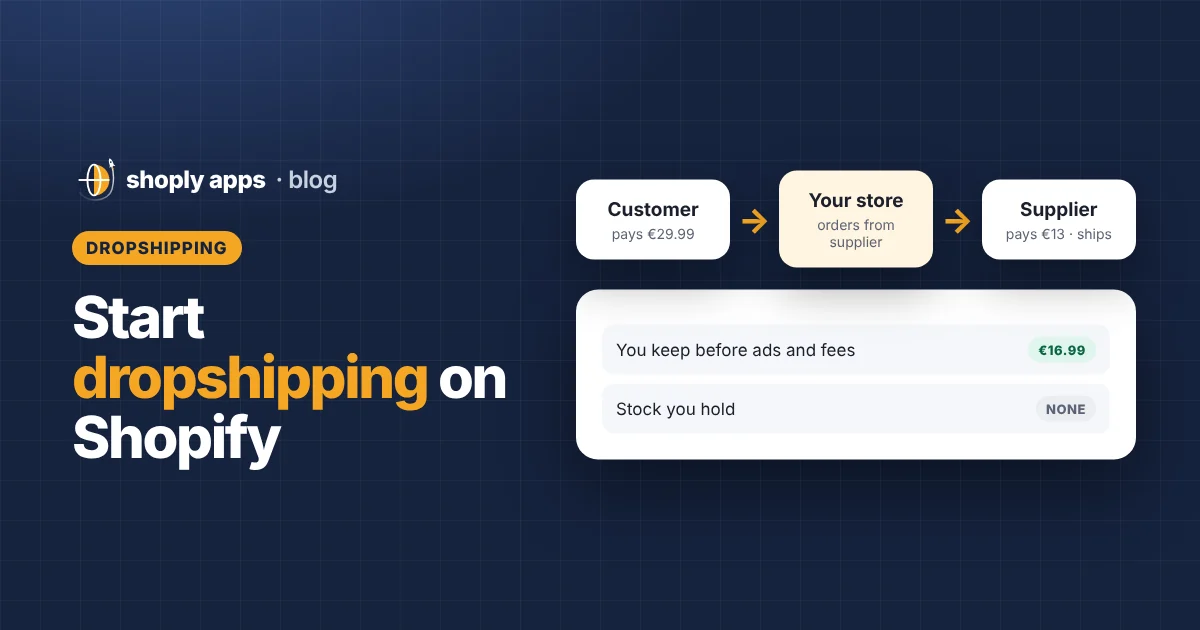
- Dropshipping means the customer pays you, you buy the item from a supplier, and the supplier ships it straight to the customer, so you never hold stock.
- To start dropshipping on Shopify: pick a niche, test suppliers with sample orders, set up your store and policy pages, import products and rewrite their content, then price for margin.
- Enter the cost per item for every variant and set prices with Price = Cost ÷ (1 − target margin), counting supplier shipping as part of the cost.
- Startup costs are mostly samples, a domain, your Shopify plan and a first marketing budget; you do not pay for inventory upfront.
- After launch, check supplier prices and stock regularly, or you can end up selling below cost or taking orders you cannot fulfil.
Learning how to start dropshipping on Shopify is mostly about getting a handful of decisions right before your first order: which products, which suppliers, what price and what delivery promise. This guide walks through each step in order, with honest pros and cons, an example budget and a launch checklist you can work through.
What is dropshipping and how does the order flow work?
Dropshipping is a way of selling where you do not keep products in stock. When a customer orders, you buy the item from a supplier, and the supplier ships it directly to the customer.
A typical Shopify dropshipping order looks like this:
- A customer buys a product in your Shopify store and pays your retail price.
- You (or a supplier app) place the same order with your supplier and pay their wholesale price, often plus a shipping fee.
- The supplier packs the item and ships it to your customer.
- You add the tracking number to the order in Shopify so the customer can follow it.
Your profit is the difference between what the customer paid and everything you paid out: the supplier's price, shipping, payment fees and any marketing that brought the order in. You are still the seller, so delivery problems, returns and refunds are your responsibility, not the supplier's.
What are the pros and cons of dropshipping?
The main advantage is that you can start without buying stock; the main drawback is that you control less and usually earn less per sale. Here is an honest comparison:
| Pros | Cons |
|---|---|
| No money tied up in inventory | Lower margins than buying in bulk |
| No warehouse, packing or shipping to manage | You depend on the supplier's quality and speed |
| Easy to test new products | Many stores may sell the same items |
| Can be run from anywhere | Delivery times can be long and hard to control |
| Low risk if a product does not sell | Supplier prices and stock change without warning |
How to start dropshipping on Shopify, step by step
Work through these steps in order. Skipping the supplier tests or the pricing step causes most of the problems beginners run into later.
1. Pick a niche
A niche is a focused group of products for a specific type of customer, such as gear for home baristas or accessories for small dogs. A focused store is easier to market and more believable than one selling everything. Look for products people already search for, that are light and hard to break in transit, and that leave room for a healthy margin. Our guide on how to find winning dropshipping products covers this in depth.
2. Choose suppliers and test them
Your supplier is effectively your warehouse and shipping team, so test them before customers do. You can find suppliers through marketplaces such as AliExpress, through supplier apps on the Shopify App Store, or by contacting wholesalers directly. For each shortlisted supplier:
- Order samples to your own address and check quality, packaging and whether anything inside mentions another brand or price.
- Time the delivery from order to doorstep. This is the number you will promise customers.
- Read their return and defect policy. Find out who pays for returns and whether faulty items are replaced or refunded.
- Check communication. Send a question and see how quickly and clearly they answer.
Keep a backup supplier for your best products if you can.
3. Set up your Shopify store
Create your store, pick a clean theme and keep the design simple: clear product photos, readable text and an easy checkout matter more than effects. Then add the essential pages customers look for before they buy:
- Shipping policy: realistic delivery times and where you ship to.
- Returns and refunds policy: how long customers have, who pays return postage and where items go back to.
- Contact page: an email address or form that you actually check.
- Privacy policy and terms of service.
Shopify's policy settings can generate starter templates, but edit them to match what your suppliers actually do. A template promising 30-day returns is a problem if your supplier does not accept returns. For legal wording, get advice that fits your country.
4. Import products and rewrite them
Import products from your supplier, then rewrite the titles, descriptions and photos rather than publishing the supplier's text. Supplier titles are often long lists of keywords, the descriptions are shared with every other store selling the item, and the photos may show the wrong colour or include another brand's logo.
Write a clear title that says what the product is, a description that answers buyers' real questions (size, materials, what is in the box, care), and use photos from your samples where you can. Add alt text to images so search engines and screen readers understand them.
5. Enter your cost per item for every variant
Cost per item is a field in each variant's pricing section in your Shopify admin where you record what one unit costs you. Customers never see it, but Shopify uses it to show your profit and margin. Each variant has its own cost, so a large size that costs more needs its own figure. Include the supplier's shipping charge if you pay it per item, so the margin you see is real.
6. Price for margin
Margin is the share of the selling price you keep as profit. Set prices from a target margin rather than guessing, using this formula:
Price = Cost ÷ (1 − Target margin)
A worked example, with example figures: a phone stand costs $9 from the supplier plus $4 shipping, so your cost is $13. For a 40% margin, the price is $13 ÷ 0.6 = $21.67, which you might round up to $21.99. Check: ($21.99 − $13) ÷ $21.99 = 40.9%. Remember that payment fees, discounts and ad costs still come out of that profit. Our guide to dropshipping profit margins shows how to account for each of them.
7. Set up payments and taxes
Set up a payment provider in Shopify's payment settings. Shopify Payments is available in many countries; elsewhere you can use a third-party provider. Fees depend on your plan and provider, so check Shopify's current pricing page rather than relying on figures you read elsewhere.
On taxes, keep it simple and get help early: register your business and handle sales tax or VAT as your country requires. A local accountant can tell you what applies to you before you take your first order.
8. Set shipping times and customer expectations
Show delivery estimates on product pages and in your shipping policy that match your sample orders, not the supplier's best case. Customers forgive a slow delivery they were warned about far more than a late "fast" one. Send tracking numbers as soon as you have them, and answer "where is my order?" emails quickly.
9. Launch and start marketing
Place a test order through your own checkout, then launch. For first marketing, start small and measure: a modest budget for social media or search ads, posts in communities where your customers spend time, and solid product pages so search engines can find you over time.
How much does it cost to start dropshipping?
Starting a dropshipping store usually costs far less than a store that holds stock, because you do not buy inventory upfront. Your main costs are samples, a domain, your Shopify plan, any paid apps and an initial marketing budget.
The table below is an example budget only. These are illustrative figures, not quotes, and your real costs will depend on your products, country and choices. Check Shopify's current pricing page for plan costs.
| Item | Example figure | Notes |
|---|---|---|
| Shopify plan | See Shopify's pricing page | Monthly subscription; trial offers vary |
| Domain name | $15 per year | Varies by registrar and domain ending |
| Product samples | $80 | Example: 4 products at about $20 each including shipping |
| Apps | $0 to $30 per month | Many apps have free plans; add paid ones only when needed |
| Logo and design | $0 to $50 | Free tools work fine at the start |
| First marketing test | $200 | A small, measured ad budget |
| Example total (excluding Shopify plan) | $295 to $375 | First month, illustrative only |
What should you check after launch?
After launch, check supplier prices and stock levels regularly, because both change without warning and your store will not update itself. If a supplier raises a price and you do not update your cost per item, you can end up selling products below cost without noticing. If a supplier runs out and your product stays live, customers can keep buying something you cannot ship, which leads to refunds and complaints. Our guide to out of stock and oversold products explains how to stay ahead of that.
A weekly routine helps: compare supplier prices against your cost per item, pause items the supplier cannot supply, and review recent delivery times. Shoply: Item Scan & Analytics, free on the Shopify App Store, scans every product for problems such as missing cost per item, prices below cost or below your margin target, and products taking orders with no stock, and ranks them by money at stake each month.
Dropshipping launch checklist
Before you announce your store, go through this list:
- Niche chosen and products shortlisted
- Samples ordered, quality checked and delivery time recorded
- Supplier return and defect policy understood, and a backup supplier noted
- Theme set up and tested on a phone
- Shipping, returns, contact, privacy and terms pages published and accurate
- Product titles, descriptions and photos rewritten, with image alt text
- Cost per item entered for every variant
- Prices set from a target margin, with fees and discounts considered
- Payment provider active and a test order placed
- Business registration and sales tax or VAT checked with an accountant
- Realistic delivery times shown on product pages
- First marketing plan and budget decided
- Weekly reminder set to check supplier prices and stock
FAQ
Do I need a business registration to start dropshipping?
It depends on where you live and how much you sell. Many countries expect you to register once you are trading regularly, and you may need to collect sales tax or VAT. Ask a local accountant before you launch.
Can I copy product descriptions and photos from my supplier?
You should not rely on them. Other stores use the same text and photos, so your pages look generic and add nothing for search engines. Rewrite descriptions in your own words and use your own photos from samples where you can.
How long does dropshipping delivery take?
It depends entirely on the supplier and where they ship from. Domestic suppliers can deliver in days, while some overseas suppliers take several weeks. Test it with sample orders and show realistic times on your product pages and shipping policy.
Is dropshipping still worth starting?
It can be a low-risk way to learn ecommerce because you do not buy stock upfront. Margins are usually thin and competition is high, so it works best when you choose reliable suppliers, price carefully and give customers honest delivery times.
Launch with a catalog that makes money
Shoply: Item Scan & Analytics, free on the Shopify App Store, checks every dropshipped product for missing costs, thin or negative margins, stock problems and weak descriptions, so you can fix them before they cost you sales.
Install free on Shopify