

EU VAT for Shopify stores: OSS, IOSS and the €10,000 threshold explained
Key takeaways
- An EU-based store that sells to consumers in other EU countries can charge its own country's VAT until those sales pass €10,000 a year in total. Above that, it charges the VAT of the customer's country.
- The One Stop Shop (OSS) lets you report all that foreign VAT in one return in your own country, instead of registering in every EU country.
- The Import One Stop Shop (IOSS) is for goods shipped into the EU from outside, in parcels worth €150 or less. VAT is charged at checkout, so the customer pays nothing extra on delivery.
- Prices shown to EU consumers must include VAT. Because VAT rates differ, the same price earns you a different amount in each country.
- Shopify handles the setup under Settings > Taxes and duties, but it doesn't decide your registrations for you.
EU VAT for Shopify stores sounds harder than it is. Since 1 July 2021 the rules for online sales across the EU have been the same in every member state, and they come down to one threshold and two reporting schemes: OSS and IOSS. This guide explains them in plain words, shows how they fit into Shopify's tax settings, and walks through an example with real VAT rates.
This guide explains the general rules. It is not tax advice. Your situation may differ, so check with an accountant before you register or change your tax settings.
What is VAT for an online store?
VAT (value added tax) is a tax on what consumers buy. You add it to your price, collect it from the shopper and pay it to the tax office. It isn't your money, and it isn't a cost to you either, as long as your prices are set correctly. Business customers with a VAT number are a separate case; this guide is about selling to consumers.
Each EU country sets its own rates. The standard rate is 19% in Germany, 20% in France, 23% in Ireland and 25% in Sweden, for example. Our EU VAT calculator lists the current rates for all 27 countries, with pages for single countries such as Germany and France.
What is the €10,000 EU distance selling threshold?
A "distance sale" is when you ship goods from one EU country to a consumer in another. The European Commission's One Stop Shop pages explain the rule: there is one EU-wide threshold of €10,000 a year. It counts all your distance sales of goods to other EU countries added together (not per country), without VAT. Some cross-border digital services count towards it too.
- Below €10,000: you can treat these sales like sales at home and charge your own country's VAT.
- Above €10,000: you charge the VAT of the customer's country, from the sale that takes you over the limit.
The test looks at the current calendar year and the year before. If you went over in either one, you charge the customer's country's VAT. You can also choose to do that from the start, even below the threshold; the Commission notes that you are then bound by the choice for two calendar years.
The threshold is only for sellers established in a single EU country. Sellers from outside the EU have no threshold at all.
What is OSS, and do I need it?
Once you charge VAT at the customer's rate, you owe VAT to several countries. Without help, that would mean a VAT registration in each one. The One Stop Shop (OSS) avoids that. You register once, in your own country, and file one OSS return every quarter listing your sales and VAT per country. You pay the total to your own tax office, and it passes the money on.
OSS is optional, but for a small store selling to many EU countries it is usually far less work than separate registrations. Register through your own tax office; the EU's VAT One Stop Shop portal links to each country's registration page.
What is IOSS for imported goods up to €150?
The Import One Stop Shop (IOSS) is for goods sent to EU consumers from outside the EU, in parcels with a value of €150 or less. Goods with excise duty, such as alcohol and tobacco, are excluded.
Without IOSS, VAT is charged when the parcel enters the EU, and the shopper usually pays it to the carrier before they get the parcel, often with a handling fee on top. It is a poor first impression, and some shoppers simply refuse the parcel. With IOSS, you charge the VAT at checkout, put your IOSS number on the shipping paperwork, and the parcel clears customs without any VAT to pay on delivery. You then report and pay the VAT in one monthly IOSS return.
For parcels over €150, IOSS doesn't apply. Import VAT and customs duty are paid when the goods enter the EU, by the shopper or by you if you ship with duties paid.
EU VAT for sellers outside the EU
If your store is based in the US, the UK or elsewhere and you ship from outside the EU, the €10,000 threshold doesn't help you; VAT is due from the first sale. IOSS is the usual choice for parcels up to €150. Most sellers from outside the EU must appoint an EU-based intermediary to register for IOSS; the Commission's registration page lists the exceptions (currently only Norway has the agreement that removes this need).
Customs duty is a separate thing from VAT. Since 1 July 2026 the EU charges a temporary €3 customs duty on low-value parcels (up to €150) from outside the EU, replacing the old duty exemption. It is set to run until mid-2028; check how it is counted for your parcels. Plan for it in your prices or shipping.
If you keep stock in a warehouse inside the EU, other rules apply, and you will usually need a VAT registration in that country. That is one to work out with an accountant.
How to set up EU VAT in Shopify (Settings > Taxes and duties)
Shopify calculates VAT at checkout from the tax registrations you enter. It doesn't register you anywhere; you do that with the tax office first. According to Shopify's EU tax setup guide:
- Go to Settings > Taxes and duties and open European Union.
- Add your home-country VAT registration.
- Under the option for collecting VAT across borders, choose OSS if you are registered for it, and enter your number.
- If you sell from outside the EU, enter your IOSS number instead. Shopify can't use OSS and IOSS at the same time, and OSS doesn't apply to orders fulfilled from outside the EU.
The settings and their names change from time to time, so follow Shopify's current help page and place a test order to each of your main countries afterwards.
Should Shopify prices include VAT?
For EU shoppers, yes. Under the EU's price indication rules, the selling price shown to consumers must be the final price, including VAT. In Shopify, you choose this under Settings > Taxes and duties. With prices that include tax, Shopify works out the VAT inside the price like this:
VAT in the price = Price × VAT rate ÷ (1 + VAT rate)
Your net = Price − VAT in the price
Once you charge each country's own VAT, the important question is what happens to a €49.00 price when the rate changes. Depending on your settings, Shopify can either keep the shown price the same in every country (so your net changes), or keep your net the same (so the shown price changes). Shoppers prefer clean prices, so most small stores keep one price and accept a small difference. Either way, check it with a test order.
Worked example: one €49 product sold across the EU
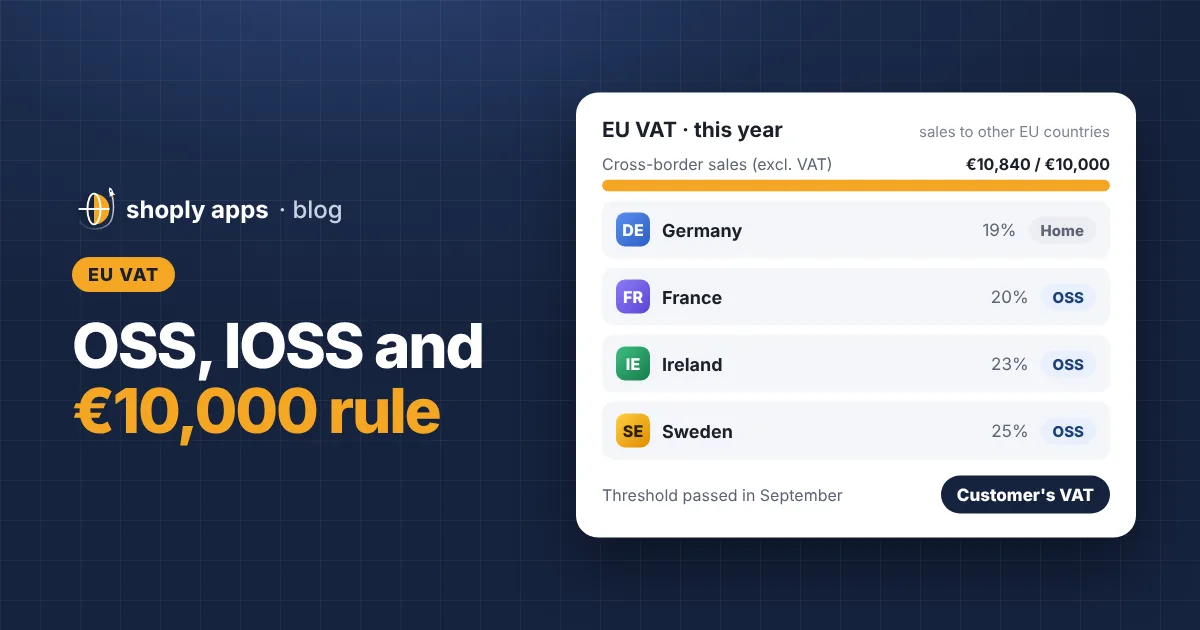
A store based in Germany sold €6,000 to consumers in other EU countries last year. This year, cross-border sales reach €10,000 in September. Until then it charges German VAT (19%) on every order. From the order that takes it over €10,000, it charges the customer's country's rate and reports those sales in its OSS return.
It shows the same €49.00 price everywhere. Here is what that price leaves the store with:
| Customer in | VAT rate | VAT in €49.00 | Store keeps |
|---|---|---|---|
| Germany | 19% | €7.82 | €41.18 |
| France | 20% | €8.17 | €40.83 |
| Ireland | 23% | €9.16 | €39.84 |
| Sweden | 25% | €9.80 | €39.20 |
A Swedish order earns €1.98 less than a German one. On a product with a €15 cost that's a noticeable dent, so check your margin at the highest VAT rate you sell at, not your home rate. The free profit margin calculator shows what is left after VAT, fees and shipping, and the currency price converter adds local VAT for countries outside the eurozone.
EU VAT checklist for Shopify stores
- Add up your sales to consumers in other EU countries for this year and last year, without VAT.
- If you are near or over €10,000 (EU seller), or ship from outside the EU, talk to an accountant about OSS or IOSS.
- Register with the tax office first, then enter the numbers in Settings > Taxes and duties.
- Make sure prices shown to EU consumers include VAT.
- Check your margin at the highest VAT rate you sell at.
- Place a test order to two or three EU countries and check the VAT on the order.
- Put the OSS (quarterly) or IOSS (monthly) return dates in your calendar.
- Keep order records per country. Shopify's tax reports help, but the return is your responsibility.
For the price side of selling abroad, read our guides to Shopify multi-currency pricing and Shopify Markets. When you have markets set up, Shoply: Translation & Markets (coming soon) will show, per country, which products have odd local prices, which are missing translations and which aren't available there.
FAQ
Do I need to register for OSS as a small Shopify store?
Not always. If your store is based in one EU country and your sales to consumers in other EU countries stay under €10,000 a year in total (this year and last), you can charge your own country's VAT. Above that, you charge each customer's country's VAT, and OSS is the simplest way to report it.
What is the difference between OSS and IOSS?
OSS is for sales within the EU, for example a store in Germany shipping to France. IOSS is for goods shipped into the EU from outside, in parcels worth €150 or less, so VAT is paid at checkout instead of on delivery.
Does the €10,000 threshold apply to sellers outside the EU?
No. The threshold is only for sellers established in a single EU country. Sellers from outside the EU charge EU VAT from the first sale, usually through IOSS for parcels up to €150.
Does Shopify file my VAT returns?
No. Shopify calculates and collects VAT at checkout based on the registrations you enter under Settings > Taxes and duties, and its reports help you prepare returns. Registering and filing OSS, IOSS or national returns is up to you or your accountant.
Check your store country by country
Shoply: Translation & Markets finds odd local prices, missing or outdated translations and products not sold in a market, ranked so you fix what matters first. It's coming soon.
See Translation & Markets