
Shopify product bundles: types, how to price them and how to set them up
Key takeaways
- A bundle is several products sold together at one price. The main types are fixed bundles, mix-and-match, volume deals (including buy one get one) and kits or multipacks.
- Shopify's free Bundles app covers fixed bundles and multipacks. For mix-and-match or tiered deals you usually need a third-party app.
- Price a bundle from its total cost, not from the sum of prices: lowest bundle price = total cost ÷ (1 − target margin).
- A bundle only pays if it brings extra sales. If shoppers would have bought all the items anyway, the bundle discount is money you give away.
- Measure bundle orders against your regular orders, in profit, and count any app fee.
Bundles are one of the simplest ways to sell more per order. You put a few products together, give a small saving, and shoppers buy three things instead of one. But a bundle priced without checking the costs can quietly cut your profit. This guide covers the main types of Shopify product bundles, the tools to create them, how to price a bundle so your margin holds, and how to tell whether it works.
What is a product bundle?
A product bundle is two or more products sold together, usually for a little less than buying them one by one. Bundles help in three ways: they raise your average order value, they make choosing easier for the shopper, and they can move slow products by pairing them with popular ones.
What types of bundles can you sell on Shopify?
| Type | Example | Good for |
|---|---|---|
| Fixed bundle | Candle + diffuser + oil, one price | Products that are used together, gift sets |
| Mix and match | "Pick any 3 snacks for €12" | Stores with many similar products and flavours |
| Volume deal or BOGO | "Buy 2, get 10% off" or "buy one, get one half price" | Products people use up and buy again |
| Kit or multipack | Starter kit, pack of 3 socks | Beginners, refills, everyday items |
Fixed bundles are the easiest to price and to keep in stock, so they are a good place to start. Mix-and-match bundles give shoppers more choice, but each combination can have a different cost, so price them on the most expensive mix.
Shopify's free Bundles app or a third-party app?
Shopify Bundles is a free app made by Shopify. It lets you create fixed bundles and multipacks from products you already sell, and it shows them as normal products in your store. A few points from Shopify's help pages:
- You set the bundle's price yourself. It is not worked out from the items inside.
- The bundle's stock is based on the stock of the items inside it, and it is tracked as overall stock, not per location.
- There are limits on the number of items in a bundle and on bundle options and variants. Check Shopify's page for the current numbers before you plan a large bundle.
Third-party bundle apps on the Shopify App Store add things the free app doesn't focus on, such as mix-and-match builders, volume tiers, "frequently bought together" widgets and bundles in the cart. They usually charge a monthly fee, and some take a share of sales. Before you pay, check three things: how the app handles stock, whether it works with your theme, and how its price compares with the extra profit it can bring. Our guide on whether upsell and bundle apps are worth it shows how to judge that.
For simple volume deals you may not need a bundle app at all. Shopify's own discounts include "buy X get Y" and minimum-quantity options.
How do you price a bundle so your margin holds?
Most people price a bundle by taking the full price of the items and removing a round percentage. That is fine, as long as you check the cost side first. Start with what the bundle costs you:
Total cost = Cost of every item + Extra packaging
Bundle margin = (Bundle price − Total cost) ÷ Bundle price
Lowest bundle price = Total cost ÷ (1 − Target margin)
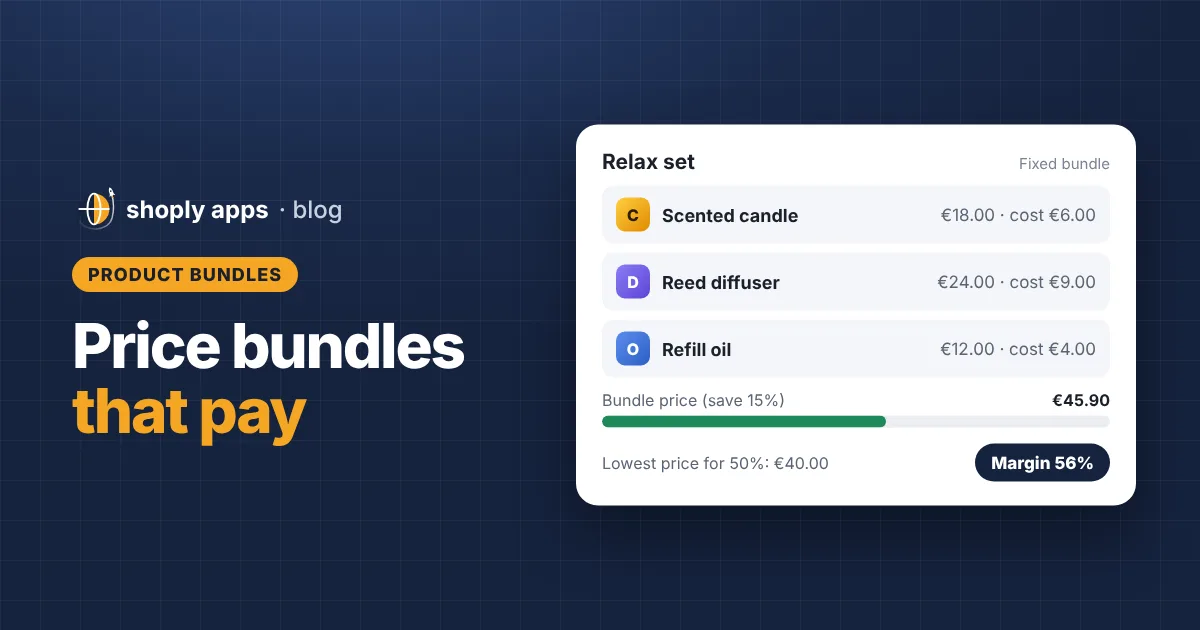
Here is a worked example. A home fragrance store bundles three products:
| Item | Price | Cost |
|---|---|---|
| Scented candle | €18.00 | €6.00 |
| Reed diffuser | €24.00 | €9.00 |
| Refill oil | €12.00 | €4.00 |
| Gift box | – | €1.00 |
| Total | €54.00 | €20.00 |
Now try a few discounts:
| Saving | Bundle price | Profit | Margin |
|---|---|---|---|
| 10% | €48.60 | €28.60 | 59% |
| 15% | €45.90 | €25.90 | 56% |
| 25% | €40.50 | €20.50 | 51% |
| 35% | €35.10 | €15.10 | 43% |
If the store wants at least a 50% margin, the lowest bundle price is €20 ÷ (1 − 0.50) = €40. So any saving up to about 25% is safe, and 35% is not. A 15% saving at €45.90 is a sensible start.
Then ask the most important question: what would the shopper have bought without the bundle?
- If they would have bought only the diffuser, you made €15 profit. With the bundle you make €25.90. That's €10.90 extra.
- If they would have bought all three items at full price, you made €34 (€54 minus €20, with no gift box). With the bundle you make €25.90. That's €8.10 less.
So a bundle works best when it adds items the shopper wasn't going to buy. Don't bundle products that are almost always bought together already. To include payment fees and shipping in the sums, use our Shopify profit margin calculator. For more on setting prices in general, read how to price your products.
How do you handle inventory for bundles?
Stock is where bundles most often go wrong. A few rules keep it simple:
- Let the bundle use the items' stock. With Shopify Bundles, selling a bundle reduces each item inside it, so you don't sell a bundle you can't pack.
- Pre-packed kits are their own product. If you build boxes in advance, track the boxes as a product, and reduce the items' stock by hand when you build them.
- Watch the slowest item. A bundle is only as available as its scarcest item. If one item runs low, the bundle sells out too.
- Check your app. Third-party apps sync stock in different ways. Test an order and look at the stock of each item afterwards.
How do you get shoppers to buy bundles?
Put the bundle where the decision happens: on the product page of each item inside it. Someone looking at the candle should see "Get the full set and save €8.10" right under the price. Show the saving in money rather than as a percentage, because €8.10 is easier to picture than 15%.
One clear photo of everything together does more than a carousel of the separate items. Give the bundle a name, like "Starter kit" or "Weekend set", and keep the number of bundles small. Two or three good ones are easier to choose from than twenty.
Timing matters too. Gift sets sell before holidays, and refill packs sell well in emails to people who bought the main product a few weeks earlier.
How do you know if your bundles are working?
Look at four numbers every month:
- Share of orders with a bundle. Bundle orders ÷ all orders. If it is very low, the bundle isn't seen or isn't wanted.
- Average order of bundle orders vs regular orders. The gap is the extra sales the bundle brings.
- Extra profit. Extra sales × your margin, minus the app's price.
- Full-price sales of the items. If single sales of the hero product fall, the bundle may only be moving the same sales to a lower price.
Our guide on Shopify app ROI shows the full method with a bundle app example, and the free app ROI calculator does it in seconds. If you use a bundle app such as our made-up example BundleBee at €49 a month, it needs to bring more than €49 of extra profit every month just to break even. Shoply: Apps ROI Tracker, coming soon, will show this for each bundle app in your store, over 7, 30 and 60 days.
Bundle checklist
- Each item in the bundle has a cost per item in Shopify.
- The bundle price is above total cost ÷ (1 − target margin).
- The bundle adds items shoppers don't usually buy together already.
- Stock is linked to the items inside, and you tested one order.
- The bundle shows on each item's product page with the saving in money.
- You compare bundle orders with regular orders in profit each month.
- Any bundle app earns back more than it costs.
FAQ
Does Shopify have a free bundle app?
Yes. Shopify Bundles is a free app made by Shopify. It creates fixed bundles and multipacks from your existing products. For mix-and-match, volume tiers or buy one get one deals, you need a third-party app or Shopify's own discounts.
How much discount should a bundle have?
Enough to be noticed, but not more than your margin can carry. Work out the lowest price with total cost ÷ (1 − target margin) and stay above it. A 10 to 15% saving is usually plenty. Start there and test.
Do Shopify bundles track inventory?
With Shopify Bundles, the bundle's stock comes from the stock of its components, so selling a bundle reduces each item inside it. Shopify notes that bundles track overall stock, not stock per location. Third-party apps handle this in different ways, so check before you install one.
Are bundles better than a discount code?
Often, because a bundle gives the saving only when the shopper buys more. A code like 10% off everything also gives the saving to shoppers who would have paid full price for one item.
Find out if your bundle app pays for itself
Shoply: Apps ROI Tracker compares orders with bundles against your regular orders and shows each bundle app's extra profit, cost and ROI over 7, 30 and 60 days, with a keep, review or cancel check-up.
See Apps ROI Tracker