


What is a good profit margin for ecommerce? Gross vs net margin explained
Key takeaways
- Gross margin is what's left after the product's cost. Net margin is what's left after everything: shipping, fees, ads, returns, discounts and apps. Markup is a different number again.
- There is no single "good" margin for ecommerce. It depends on your products, prices and how you get customers. Use rules of thumb as a starting point, and measure your own numbers.
- In our worked example, shipping, packaging, payment fees, ads, returns and apps take more than three quarters of the gross profit on each order.
- Shopify can show your gross margin per product and in its profit reports, but only for products with a cost per item filled in.
- Small price changes move profit a lot. In our example, a €2 price rise lifts profit per order by over 40%.
"What is a good profit margin for ecommerce?" is one of the first questions new store owners ask, and the honest answer is that it depends. A store selling €15 phone cases lives in a different world from one selling €400 furniture. What you can do is understand which margin people are talking about, see where your money goes on each order, and work out your own number in Shopify. This guide does all three, with a worked example.
Gross margin vs net margin vs markup
These three get mixed up all the time, and the mix-up leads to prices that are too low.
Gross margin = (Revenue − Product cost) ÷ Revenue
Net margin = (Revenue − All costs) ÷ Revenue
Markup = (Price − Product cost) ÷ Product cost
Gross margin only looks at what you paid for the product. If you sell a mug for €20 that cost you €8, your gross profit is €12 and your gross margin is 60%.
Net margin is what you actually keep. From that €12 you still pay shipping, payment fees, ads, packaging and the apps your store runs on. Net margin is always lower than gross margin, often much lower.
Markup compares the profit to the cost instead of the price. The same mug has a 150% markup (€12 ÷ €8). That's why "I add 100% to my cost" sounds generous but gives only a 50% gross margin. To switch between the two:
Margin = Markup ÷ (1 + Markup)
Markup = Margin ÷ (1 − Margin)
Our free Shopify profit margin calculator shows margin, markup and profit per order side by side, so you don't have to do this by hand.
What is a good profit margin for ecommerce?
You will find plenty of "average ecommerce profit margin" figures online. Most come from surveys of big companies or from a single industry, and they rarely say how they were measured. They are a weak benchmark for a small Shopify store.
A more useful approach is to set a minimum that your own costs require. The table below is a rule of thumb, not industry data. It assumes you pay for shipping, payment fees and some advertising, as most small stores do.
| Gross margin | What it usually means (rule of thumb) |
|---|---|
| Below 30% | Very tight. Shipping, fees and ads can wipe out the profit. Works mainly with high order values or almost no ad spend. |
| 30–50% | Workable, but only if you watch shipping, discounts and ad costs closely. |
| 50–70% | Comfortable for most small stores. Room for paid ads, free shipping and the odd sale. |
| Above 70% | Common for own-brand and handmade products. Usually leaves room to grow with ads. |
For net margin, the question is simpler: is it positive on every order, and is it enough to pay you for your time? A store with a 60% gross margin can still lose money on each order if ads cost too much.
If you dropship, your gross margin is usually lower because the supplier's price includes their own profit; our guide to dropshipping profit margins covers that case. For setting prices from scratch, see how to price your products.
What eats into ecommerce margins?
Gross margin is the number on the product page. Net margin is the number in your bank account. The gap between them comes from costs that are spread over many orders and easy to forget:
- Shipping and packaging. Free shipping is not free; you pay it. A free shipping threshold can help, if you set it with care (see how to set a free shipping threshold).
- Payment fees. A percentage of each order plus, often, a small fixed fee. Selling in other currencies adds a conversion fee.
- Ads. What you spend to get one order. For many small stores this is the biggest cost after the product itself.
- Returns. Return shipping, plus items you can't sell again.
- Discounts. A 20% code on a product with a 40% margin takes half your gross profit.
- Apps and subscriptions. Each one looks small. Divide your monthly total by your monthly orders to see the cost per order.
Worked example: from gross margin to net margin
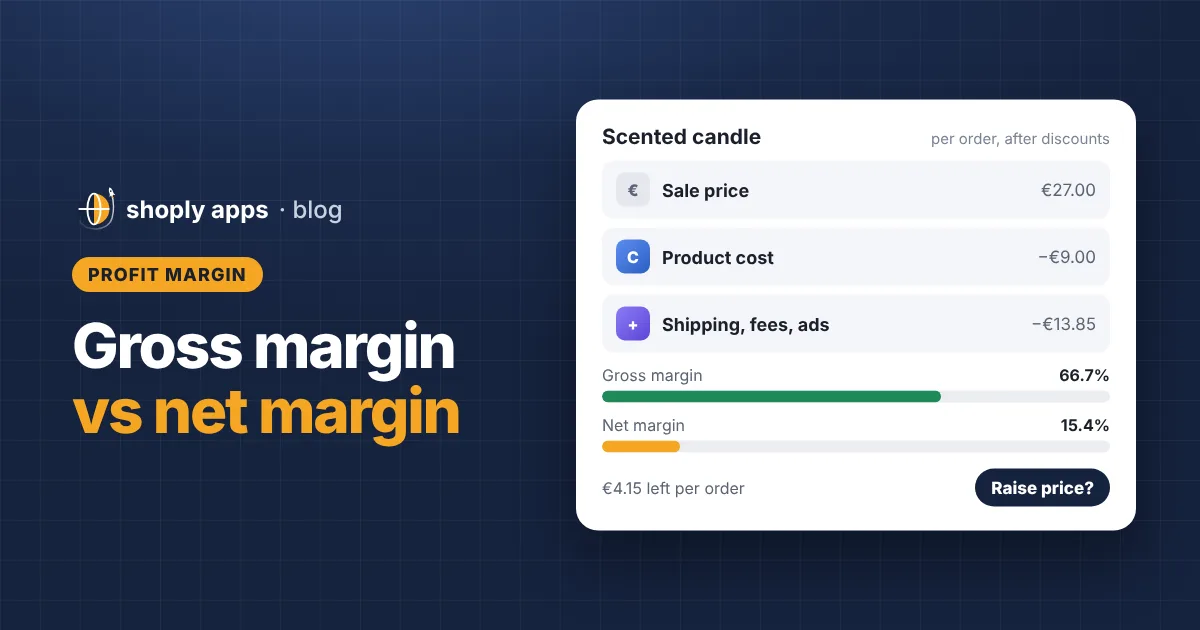
A store sells a scented candle for €30.00 (prices here are before VAT). The candle costs €9.00. Over a month, shoppers use discount codes worth 10% on average, so an average sale brings in €27.00. The fee and return rates below are example figures; use your own.
| Per order | Amount | Left over |
|---|---|---|
| Price after 10% discount | €27.00 | €27.00 |
| Product cost | −€9.00 | €18.00 |
| Packaging | −€1.00 | €17.00 |
| Shipping (free for the shopper) | −€5.00 | €12.00 |
| Payment fees (3% example) | −€0.81 | €11.19 |
| Ads per order | −€6.00 | €5.19 |
| Returns (2% example) | −€0.54 | €4.65 |
| Apps (€100 a month ÷ 200 orders) | −€0.50 | €4.15 |
The gross margin is €18.00 ÷ €27.00 = 66.7%, which looks great. But only €4.15 of every order is left, a net margin of 15.4% before your own fixed costs and income tax. More than three quarters of the gross profit went on costs that never show up on the product page.
Now raise the price to €32.00. With the same discount, fees and returns, the store keeps €5.86 per order instead of €4.15: 41% more profit from a price change most shoppers won't notice. That's the strongest lever most small stores have.
How to find your profit margin in Shopify
Shopify can only work out your margin if it knows what each product costs you. Here's the order to do it in:
- Fill in cost per item. Open a product, and in the pricing section enter the Cost per item. Shopify then shows the profit and margin next to the price. Do it for every variant, since sizes often cost different amounts.
- Open the profit reports. Under Analytics > Reports, depending on your plan, you'll find reports such as gross profit by product. According to Shopify's help page on profit reports, they only count variants that had a cost when they were sold, so products without a cost are simply missing.
- Compare the report with the product page. The report includes discounts, so it is often lower. Shopify's own example: a $20 shirt that costs $10 shows a 50% margin on its product page, but sold with a 25% discount the margin is about 33%.
- Add the costs Shopify doesn't see. Ads, packaging and apps live outside these reports. Add them per order, as in the example above.
Step 1 is where most stores fall short. A catalog with a few hundred variants and half the costs missing gives you a margin report that looks fine and means very little.
How to raise your profit margin
Start with the products that sell most, because a small change there matters more than a big change on a product that sells twice a year.
First, find the problems. Look for products sold below cost (it happens more than you'd think after a supplier price rise) and products with no cost per item at all. Then test small price rises on your best sellers; the example above shows how much €2 can do. When many products need new prices, a bulk price edit is faster than going one by one.
After that, look at the order. Bundles and add-ons can raise the average order value, which spreads shipping and ad costs over more revenue; see how to increase average order value. Cut discount codes that run all year, and cancel apps that don't pay for themselves.
Profit margin checklist
- Fill in cost per item for every product and variant.
- Write down your gross margin per product, using the price after typical discounts.
- Add up shipping, packaging, payment fees, ads, returns and apps per order for last month.
- Work out your net margin per order. It must be positive.
- Find any product sold below cost or below your minimum margin, and fix it first.
- Test a small price rise on your three best sellers.
- Check again every month, and after every supplier price change.
Doing this by hand across a whole catalog is slow. Shoply: Item Scan & Analytics is a free Shopify app that does the checking for you: it finds products sold below cost or under the margin you set, lists variants missing a cost per item, and ranks every problem by the money at stake. You can then move prices to your target margin in bulk, with a preview before anything changes and undo afterwards.
FAQ
What is the difference between gross margin and net margin?
Gross margin is the share of revenue left after the product's own cost. Net margin is the share left after all costs, including shipping, payment fees, ads, returns, discounts and apps. Net margin is always lower.
Is a 50% margin the same as a 100% markup?
Yes. If a product costs €10 and sells for €20, the markup is 100% of the cost and the gross margin is 50% of the price. Margin = markup ÷ (1 + markup).
What is a good gross margin for a small Shopify store?
There is no official benchmark. As a rule of thumb, many small stores that pay for shipping and ads aim for a gross margin of 50% or more, because below about 30% those costs can wipe out the profit. Check that your net margin per order stays positive.
Why does Shopify's profit report show a lower margin than the product page?
The product page compares the full price with the cost per item. The profit report uses what you actually sold for, after discounts, and only counts variants that had a cost when they were sold.
Find the products eating your margin
Shoply: Item Scan & Analytics finds products sold below cost or under your target margin and missing costs, ranks them by money at stake, and fixes prices in bulk with preview and undo. Free on the Shopify App Store.
Install Item Scan free